
Exploration, Fracturing, and Laser Safety
Mining exploration begins by sending a ping to the scanner (TAB key) in SCM or NAV mode to locate deposits within a 12-kilometer radius. Once extraction mode is activated (M key), hovering over the rock displays its stability and composition on the interface. The operator then activates the extraction laser (left-click) and adjusts its power using the scroll wheel to bring and maintain the energy level within the optimal green zone until the rock fractures. Excessive energy input causes the gauge to swing into the red zone, risking a rock explosion, loss of ore, and destruction of the ship.
Module content
Once the equipment has been selected, the mining operation begins with a survey of the area, followed by monitoring the energy injected into the rock to ensure it fractures safely.
Scanner-Based Prospecting and Detection
You can search for mineral deposits directly from the cockpit of your ship or vehicle:
- Flight Modes: Set your ship to SCM (Space Combat Maneuvers) or NAV (Navigation) mode.
- Radar Pulse (Ping): Press the dedicated key (TAB key by default) to send a radar pulse.
- Range and Detection: The scanner detects points of interest within a radius of about a dozen kilometers, identifying the presence of exploitable mineral veins.
Analysis and Properties of the Deposit
When you're near the ore deposit, activate mining mode (M key by default in a ship in SCM mode) and target the rock to start the automatic analysis. A gauge will appear on the right side of your user interface (UI), displaying key data about the rock:
- Rock Stability: Determines how difficult it is to keep energy levels under control.
- Composition and Strength: Provides information on the presence of precious minerals and the force required to penetrate the structure.
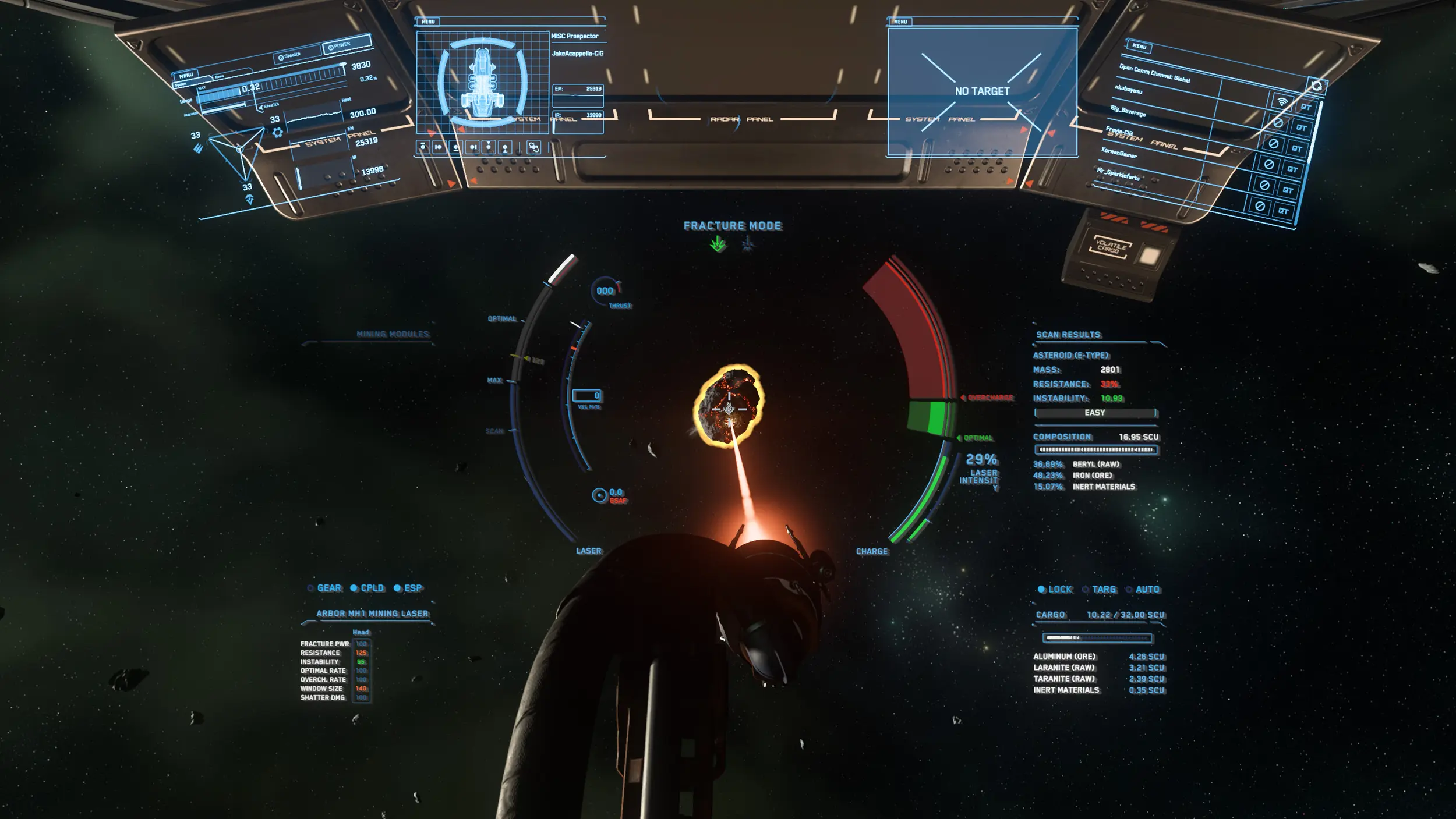
Laser Control and Optimal Area
After the analysis, the fracturing phase involves injecting heat into the reservoir:
- Activation: Turn on the extraction laser (default: Left-click).
- Power Control: Gradually adjust the laser power (by default, using the mouse wheel).
- The Green Zone (Optimal Zone): The goal is to raise the rock's energy level until it reaches the green window. You must keep the energy level within this optimal zone until the rock shatters.
Overheating Risks and Safety
Improper power management can destroy the deposit and endanger the operator:
- The Red Zone (Overcharge Zone): If the power being fed into the system is too high, the energy level enters the red zone.
- Explosion Risk: Prolonged overloading causes the rock to explode violently. This explosion destroys the valuable minerals contained within the rock and can seriously damage—or even destroy—your ship or vehicle.
Validation exam
Exam locked
Complete the previous module to unlock this exam.